What does the DataStream demo show?
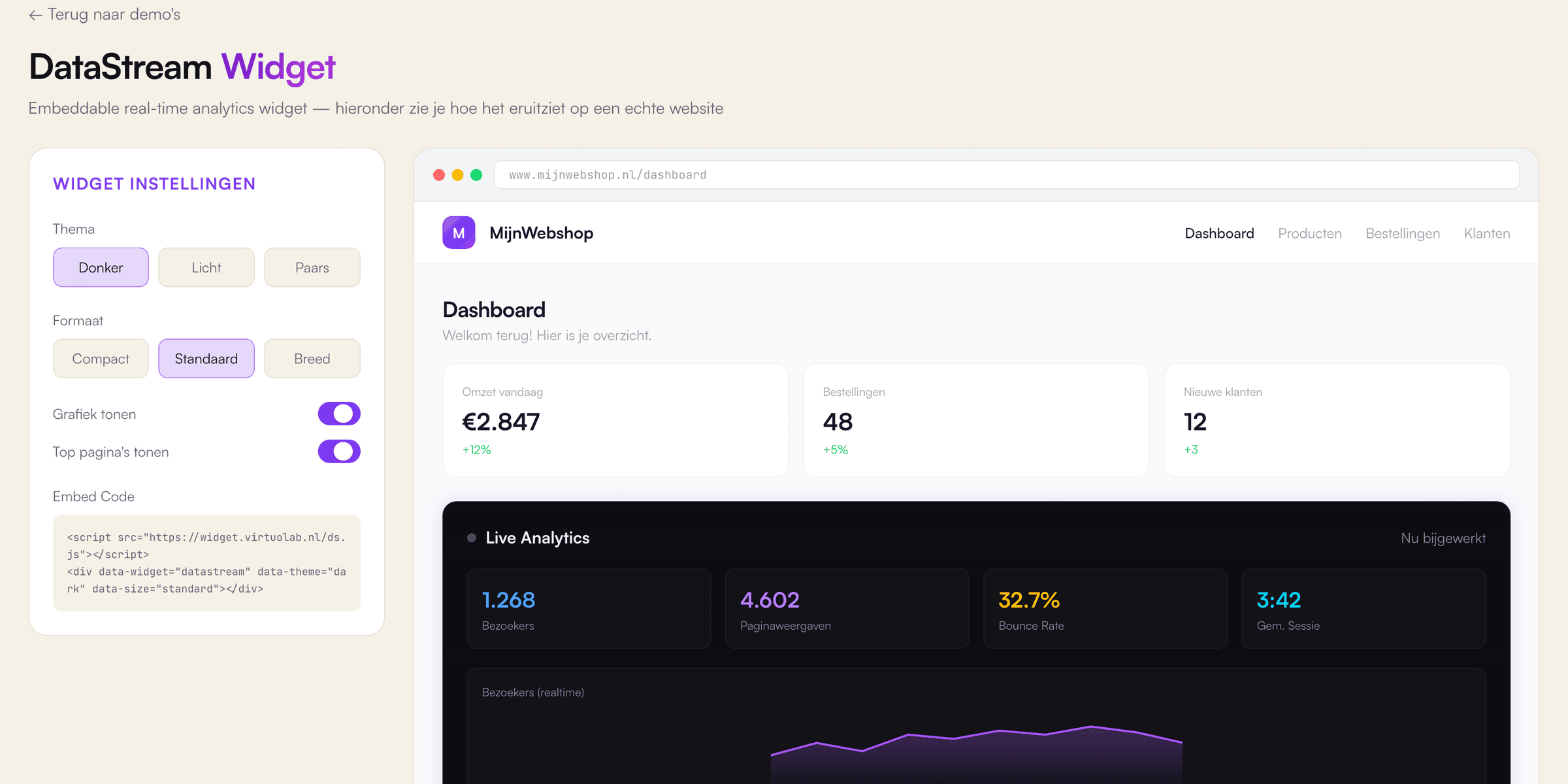
The DataStream demo is an embeddable analytics widget, built by VirtuoLab with React, Next.js and TypeScript and shown inside a sample webshop dashboard. First, the widget shows four figures: visitors, page views, bounce rate and average session length. Visitors, page views and bounce rate change every 2 seconds through simulated data, with the bounce rate kept between 15% and 60%. A line chart scrolls along with the newest value. Second, a top list of 4 pages shows the most viewed paths, for example the checkout page, with a bar per page. Third, a settings panel switches between a dark, light and purple theme and between a compact, standard and wide size. Two switches hide or show the chart and the top pages. Additionally, the panel prints an embed snippet with the chosen theme and size as data attributes. The surrounding webshop, orders and products are sample content.
Which business problem does an embeddable widget like DataStream solve, and for whom?
An embeddable widget like DataStream solves the problem of data which lives in one system but is needed on another screen. SaaS companies, platforms with a customer portal and businesses with partner or reseller dashboards benefit most. The business places one script and one HTML element on an existing page. The widget then shows live figures in the house style of the host page, even on a website built with WordPress. Additionally, one widget can appear in many places, for example on the websites of 20 customers, while the code is maintained in one location. In practice, a widget is a cheaper first step than a complete dashboard. A business can start with the three or four figures customers request most. Security matters, too: every customer should only see figures from the customer's own account. According to OWASP, broken access control appeared in 100% of the applications tested for the OWASP Top 10:2025. Access checks therefore belong in the API, not in the widget.
How does VirtuoLab build an embeddable widget for a real business?
VirtuoLab builds an embeddable widget for a real business as a small, self-contained script with a secure API. Step 1 is a scope session about the figures, the data source and the websites which will host the widget. Step 2 is design and validation of themes and sizes, similar to the DataStream demo. Step 3 is building and testing, for example with React and TypeScript for the widget and a Node.js API with a PostgreSQL database. Script size matters on a host page: according to HTTP Archive's Web Almanac 2025, only 48% of mobile websites passed all three Core Web Vitals. In a real project, every request is checked against the account of the host site. Finally, step 4 is launch and support. As an indication, a simple web app costs €5,000 to €10,000 with a lead time of 3 to 6 weeks, and an embedded KPI dashboard €12,500 to €35,000 or more. The exact price follows after a free introductory call.