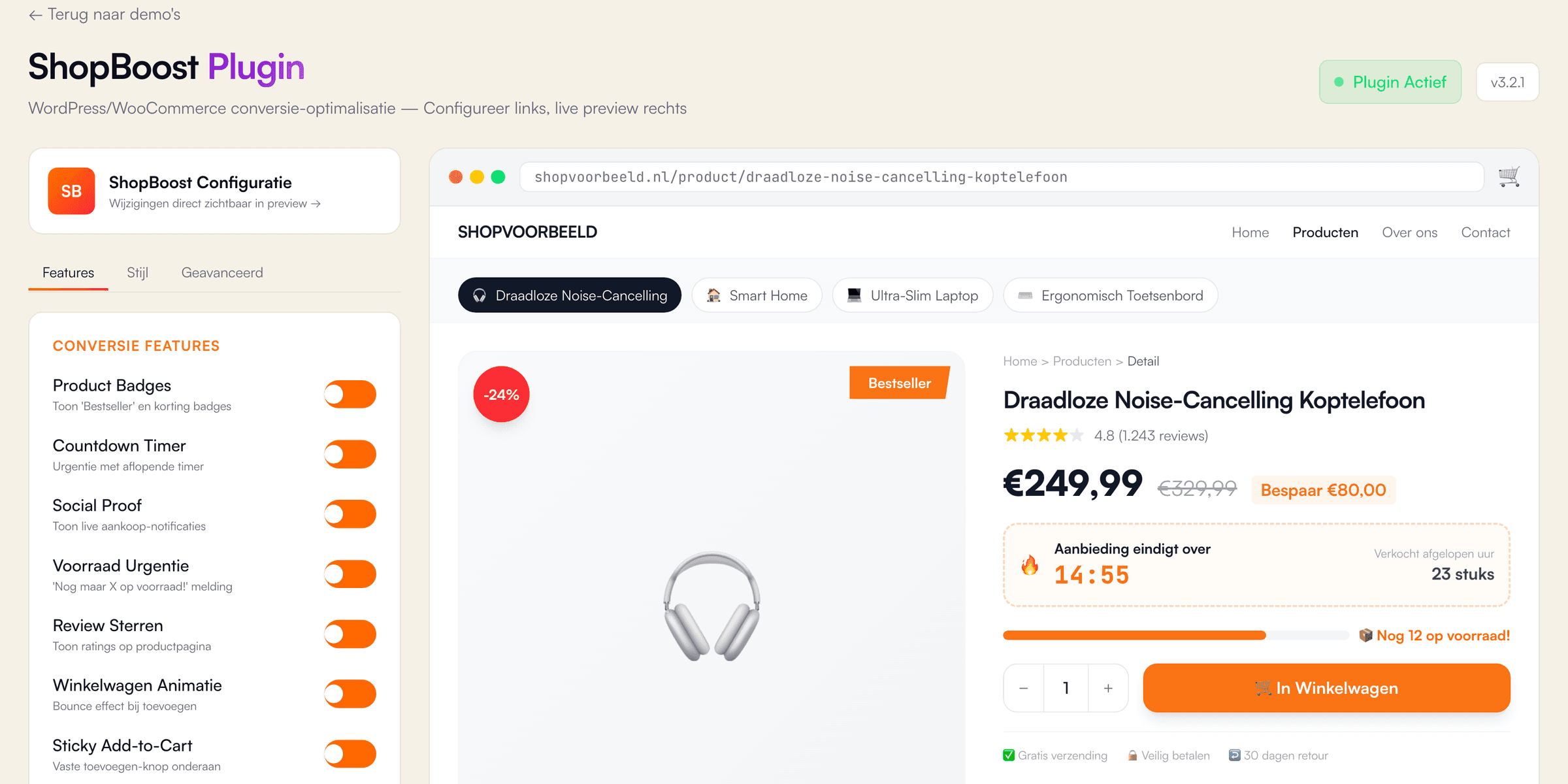
What does the ShopBoost demo show?
The ShopBoost demo is the settings screen of a WooCommerce conversion plugin, built by VirtuoLab as an interactive React page with Next.js and TypeScript. First, the Features tab offers 7 switches: product badges, a countdown timer, purchase notifications, a low-stock warning, review stars, a cart animation and a sticky add-to-cart button. Second, the Style tab sets the badge style, the badge position, one of 5 accent colours and a countdown length in minutes, from 5 to 60. Third, the Advanced tab shows an API key field, a connection notice and a language menu, all for display only. On the right, a sample shop with 4 products shows every change at once. The discount badge calculates the percentage from the old and new price, for example 24% on the sample headphones. Adding a product updates the cart counter and shows a confirmation. The demo is not a real WordPress plugin, and all shop data is invented.
Which business problem does a WooCommerce plugin like ShopBoost solve, and for whom?
A WooCommerce conversion plugin is a WordPress extension which adds sales elements, such as badges or a countdown, to product pages without changes to the theme code. The business problem is control: a webshop owner wants to test an idea without waiting for a developer. Owners of shops built with WooCommerce, e-commerce managers and agencies with several client shops benefit most. Each switch in ShopBoost controls one element, and a live preview shows the effect before customers see the change. Additionally, one plugin with several features avoids a stack of separate plugins. Fewer plugins also means less risk: according to Patchstack, plugins accounted for 91% of the 11,334 new WordPress vulnerabilities found in 2025. In practice, honesty matters with conversion features. A countdown, a stock warning or a purchase notification should always come from real order and stock data. Invented urgency misleads customers and damages trust in the shop. VirtuoLab therefore connects such features only to real WooCommerce data, or leaves a feature out.
How does VirtuoLab build a WordPress plugin for a real business?
VirtuoLab builds a WordPress plugin for a real business as a custom PHP plugin, with a settings screen in the WordPress admin and hooks into WooCommerce. Step 1 is a scope session about the features, the theme and the plugins already installed. Step 2 is design and validation of the settings screen and the shop elements, similar to the ShopBoost demo. Step 3 is building and testing on a staging copy of the shop, for example with JavaScript, PHP and the WordPress and WooCommerce APIs. Finally, step 4 is launch and support, including updates for new WordPress versions. Updates matter: according to Patchstack, 46% of the WordPress vulnerabilities found in 2025 had no fix from the developer in time for public disclosure. As an indication, a simple plugin costs €2,000 to €5,000 with 1 to 3 weeks of work, a medium plugin €5,000 to €10,000 and a complex plugin €10,000 to €25,000. The exact price follows after a free introductory call.